
Drafts until you publish
New shifts are drafts nobody else can see. Publish the week, or only the shifts you tick, with one email and one push per person.
Rostering
A roster by client and site, or by person, that knows who holds which licence, who is on leave and who needs their rest, and tells everyone the moment it's published.
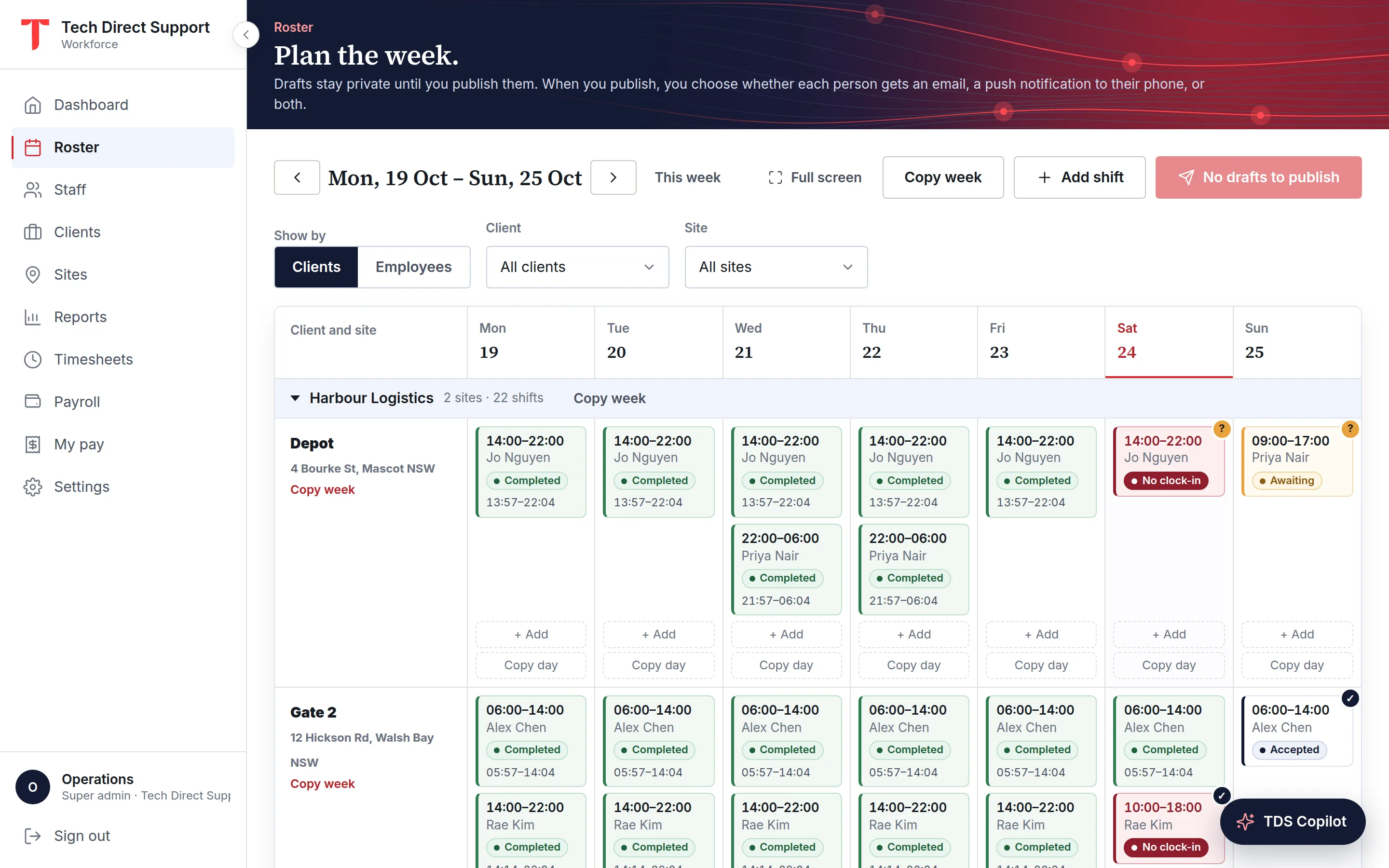
New shifts are drafts nobody else can see. Publish the week, or only the shifts you tick, with one email and one push per person.
Repeat a shift weekly or fortnightly for up to a year, or copy a day, a site or a whole week forward up to eight weeks.
Rank who could take a shift by their record at the site, rest and hours, or fill every unassigned shift with the best fit in one go.
The roster shows a week by client and site, so you can see which posts are covered, or by person, so you can see who is doing what. Shifts nobody has been given sit in an Unassigned row until you fill them, and they can't be published empty.
Each shift carries a short note for the roster, instructions, the duties for the shift as a checklist, longer notes, and internal notes that only managers see. Staff see what they need on their phone.
Rostering mistakes are cheapest before staff hear about them. TDS Workforce Management won't give someone two shifts that overlap, won't put someone on a site whose required licences they don't hold, and won't roster someone over approved leave.
It warns, rather than blocks, when someone would get less than the minimum rest between shifts (eight hours unless you set your own), go over your weekly hours or days-in-a-row limits, or work outside the hours they usually do. Publishing skips any draft that breaks a hard rule and lists it, so the rest of the week still goes out.
When you publish, each person gets one email and one push notification listing their new shifts, not one message per shift. Changing or deleting a published shift asks first and tells the person. Clients who want it are emailed the shifts at their sites.
Staff accept or decline each shift from the app, with a reason if they decline. A decline goes straight to their manager by push and email, and the shift stays red on the roster until it's covered.
A shift nobody is on can be offered to staff: a manager's offer goes to their own team, an admin's to everyone. Each of them who is free, holds the site's licences and isn't on leave gets a push and can claim it from the app; you approve one claim and the shift is published to them. Staff can also offer one of their own shifts to a teammate, who accepts before their manager approves, and the roster's own checks run on every change.
To fill a week quickly, Fill unassigned gives each empty shift to the best suggested person with nothing to warn about. The shifts stay drafts, so you check them before anyone hears.
Your team already lives on WhatsApp, so notifications go there too. Staff who opt in get their new shifts, changes, open shifts and missed clock-in reminders on WhatsApp as well as by email and push. Managers can also share offered shifts to the team's WhatsApp group in one tap, with the day, times, site and a link to claim them.
Most rosters look like last week's. Copy a day or a week, from one site or the whole roster, to the next week, a chosen week, or each of the next one to eight weeks. Choose the days, whether to keep the same people, and what to do when someone is already booked.
Copies are always drafts. Anything that would repeat a shift already on the roster, land on an inactive site or fall in a finalised payroll month is skipped and listed with the reason.
Questions
Yes. Managers roster the people who report to them and unassigned shifts. Admins roster everyone in the organisation.
The app is the easiest way, with shifts, accept or decline and clock-in in one place. Staff can also sign in to the web portal from any browser, and those with an email address get each published roster by email.
Yes. An end time at or before the start runs into the next day, and the shift belongs to the day it started. Copies keep their local times across daylight-saving changes.
Yes, within their team. A staff member offers their shift to a teammate who is free and licensed for it; the teammate accepts, then their manager approves, and both are told.
Keep reading
Rostering · Security
A practical guide to a security roster that covers every post: start from the contract, check licences and rest, publish early, and plan for the no-show.
Features
Clock-ins checked against each site's radius or made on a site kiosk, with breaks, photos, checklists, signatures and alerts.
Features
Leave requests from the app, annual and sick leave balances, a hard block on the roster, and usual availability.
Ask for a demo and we'll walk you through the portal and the app on your time zone. Plans start at A$5 a person a month, with 30 days free. Already set up? Sign in.